Wednesday, March 2, 2022

Teams Calling | Number porting diary - Day 3

Port-out from Microsoft 


Interesting requirement came today for me which is port-out from Microsoft. Most common request which we get everyday port-in request, but this requirement which they have fully went on cloud (Teams born) environment both of them look for moving some numbers to local telco with Direct Routing SBC at premises. My customer is trying to achieve on-prem PBX integration and also some numbers are plan to use for elevators and guards with analog devices.

Basically on this process, customer need a Microsoft 365 port out PIN to be created.  

How to set up your PIN:

   1.Sign into Office 365 with your work or school account

   2.Go to the Office 365 admin center > Admin centers > Teams Admin Center
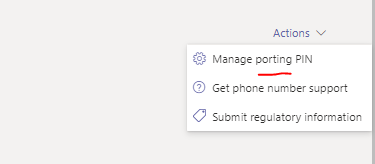
   3.In the left navigation, choose Voice > Actions (on right top) > Manage Porting  PIN


   4.Click Set up and manage the PIN that is used for transferring or porting numbers to another service carrier

   5.In the Set or change your port out PIN panel, enter your PIN and click Save

The process will take 14 days but practically if you provide all the details on the LOA correctly it can be get it done even within 8 days according to my experience. 

Once you submitted the request to the local telco you can share the ticket details with PTN team where you can get help to expedite the process. Microsoft process was pretty straight forward compare to legacy telco. 


Wednesday, February 23, 2022

 Teams dial pad is missing - 5 items to check!

In my personal experience even you Move users (Move-CsUser) it doesnt mean it will be all activate in the Microsoft Teams backend. It will take time to replicate microservices and sometimes it goes up to 24hrs. 

Following 4 items are important  
- Phone system license attached with the user 
- SfB Online Plan 2 License 
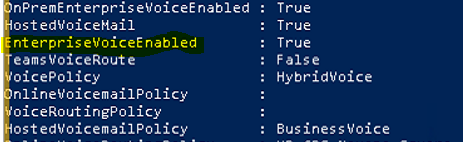
 -EnterpriseVoiceEnabled
 - Hosting provider change to sipfed.online.lync.com 
 - CsOnlineVoicePolicy is assigned to the user or calling plan


How to check this using PowerShell, Connect to Teams using PowerShell and 
Get-CsOnlineUser -identity <mailaddress@abc.com> | ft *LineUri, HostingProvider, EnterpriseVoiceEnabled

In my personal experience make sure above items are in checked. 

and addition to above items you can check this tool too - Dial pad in missing in Teams - Microsoft Teams | Microsoft Docs 

Tuesday, February 22, 2022

M365 Secure score - Turn on the common attachments filter setting for Anti-malware on EOP

This filter will help us to prevent certain types of files that are risker to send and receive via emails. To make sure these file types don't get through, enable the common attachment filter.  

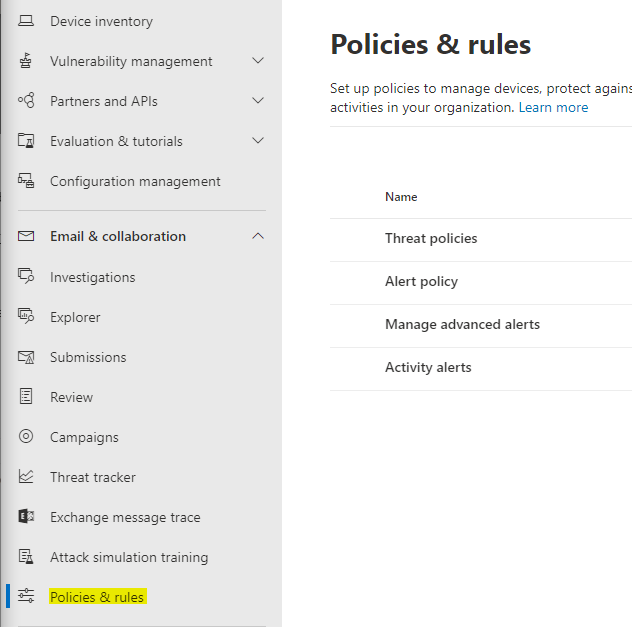
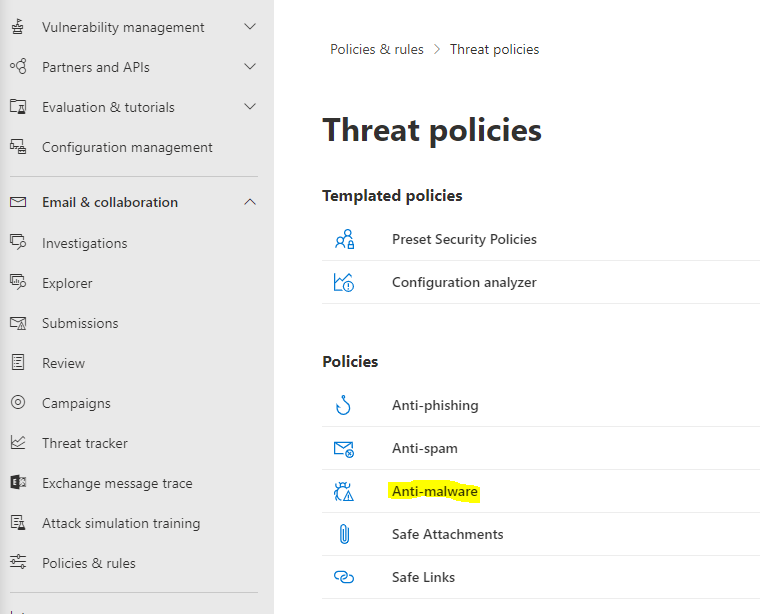
How to access -  https://security.microsoft.com/ then go to Policies & Rules > Threat policies > Anti-Malware


It will have a long list 


You can use the default list of file types or customize it. 
Messages with the specified attachments types are treated as malware and are automatically quarantined. 

Change notification status to different organization requirement. 

Tuesday, February 8, 2022

Teams Calling | Number porting diary - Day 2


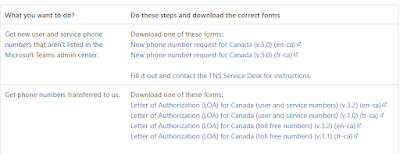
Find the LOAs for Teams Calling migration

Following URL will be the listed every LOA and LOA format will be different from each market/country and also requirement will be different from telco to telco.

 Phone number management for Canada - Microsoft Teams | Microsoft Docs


This article will have all the LOA for Subscriber Numbers (DID), Service Numbers (AA, CQ) and Toll-free. 
When you submit a LOA it will be important to filled it correctly and include correct information to reduce number rejections from the telco. In this case it will be Microsoft TN support team (PTN) team (which mention in my previous article). 
- BTN (Billing Telephone Number) mentioned in the ER (Equipment Record) or  CSR (Customer Service Record). 
- Account Number can be found on the bill or ER/CSR
- Signatory Name of the person of the organization and this can be change when person is left organization via direct email from the client to respective telco. 
- Service Address mentioned correctly (it can be multiple service address)
- Company Name without a mistake not even a dot :)  

I got many LOA rejected for very simple things but it is not simple because its purely security purpose they validate those.

ER - Term mostly used by Canada telecom providers/ISP


Teams Calling number porting diary - Day 3


Wednesday, February 2, 2022

DNS Suffix , Internal DNS zones, External DNS (M365_UCTechiLab#5) - AD and Exchange 2016

DNS Suffix , Internal DNS zones, External DNS (M365_UCTechiLab#5) - AD and Exchange 2016


Access the AD Server and DNS and Create new DNS Zone. 

I would suggest to fix the it/DNS suffix add then you can verify by accessing the ADUC and create user 


For DNS work in the Exchange and also AADConnect to verify UPNSuffix we should have domain in the both side of the ADs. AAD will have the automatically when we verify part of the tenant verification by adding a CNAME in public domain where you have domain records. Addition to that if you dont have this in AD DNS (On-Prem) then you will required to add. 

Follow the steps and it will be straight forward in new environment and if you already using this domain in your exchange then this wont be a problem or not required to create. 

Go to Active Directory Server (AD) > AD Domains and Trusts 


Right click on top Active Directory Domains and Trust > UPN Suffixes and Add the UPN you required 


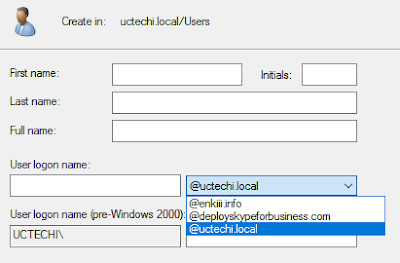
Once you save above settings. When you try to create users you able to see that. 


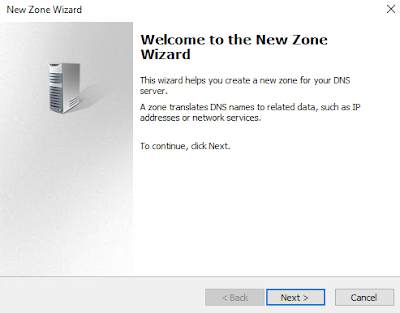
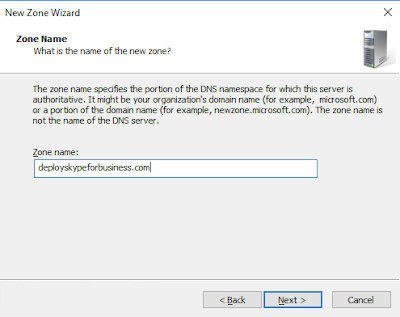
for DNS zone we will be creating new zone under this name 


next step


Add the domain you which you created in the DNS Suffix


Do not allow dynamic updates 


Completed


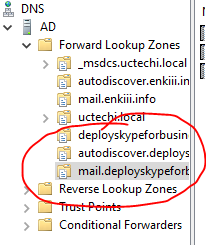
Adding Exchange A records on all new zones 

Wednesday, January 26, 2022

Teams Calling | Number porting diary - Day 1


During my time at Microsoft I did not have a chance to migrate any customer since Microsoft Calling plan was not available for Asia Pacific.

The list of articles here are all my experiences with migrations to Teams calling plan and also from Teams calling plan to Telco porting. I searched in several places for documentations by individuals about the process and how to proceed, and I did not have much luck in my search. Hence, I thought why not I give back to the community about my daily hustle in summary.

Number porting can be very simple to complex, this completely depends on the environment, the type of numbers available in that environment, their usage, and the level of knowledge the customer has about their own environment. Prior to submitting any order (be it Microsoft or any Telco around the world), number planning is required, and the entire process can consume many hours.

Porting request submission 

Porting request(s) can be submitted from two locations:

1.  Teams Admin Center (TAC) > Voice 


2. Access via PTN portal - https://pstnsd.powerappsportals.com/ 


Friday, January 21, 2022

Cannot assign phone number to licensed user - Microsoft Teams Calling 

Currently i'm doing some testing related to Microsoft Teams calling, It seems to me like Teams Admin center replication with M365 backend. According to my experience sometimes it can be quick, or replication can go up to long hours. 

Refer this - https://docs.microsoft.com/en-us/microsoftteams/assign-change-or-remove-a-phone- number-for-a-user 

but sometimes we get lucky using PowerShell.  PS faster than GUI /Admin  center since it is talking to M365 fabric directly.

Try using PowerShell  (Connect to Microsoft Teams first)

#Connect to Microsoft Teams

$credential = Get-Credential

Connect-MicrosoftTeams -Credential $credential

 Once it prompt, use your Teams Admin login and password

 Once you connected following command will help you to assign using PowerShell

Set-CsOnlineVoiceUser -Identity teste5@enkiii.info -TelephoneNumber +136567xxxx -Verbose 

at the moment i'm still getting error to assign the number. Its only 1 hr gone from the time i added the license and Phone number and Location


Similar article found - Can not assign phone number to licensed user - Microsoft Tech Community
When i was checking Teams Admin Center (https://admin.teams.microsoft.com) then i found calling policy not assigned and Emergency address was "null". Once i done with those variables, i able to assign a number by selecting user


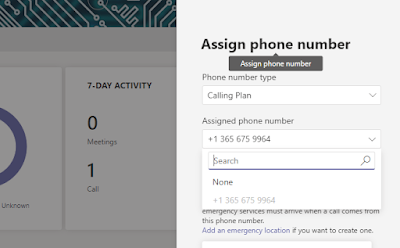
Assign phone number 


 it was showing dial pad in the Teams client and manage to dial calls

            Assign Emergency address  


It was pretty easy for customers who have small and medium size, less complex environment to have hosted/cloud telephone service from Microsoft PhoneSystem using Microsoft Calling plans. #CallingPlans #MicrosoftPhoneSystem 

Enjoy!


Would you like to join to our community - https://chat.whatsapp.com/CqUn6StAKL5L9Bo0XlIkjK  


Teams Direct Routing with Ribbon 8k - WebGUI is not loading

Note: I start using Substack for my articles please please follow at   https://kloudnews.substack.com/ Recently got an alert due to connecti...