Note: I start using Substack for my articles please please follow at Madushka Dias writes | Kloud | Substack
Teams Voice Configure routing options for unassigned phone numbers
Deprovisioned users still receiving calls
Legacy telephony world this feature it called many words - Catch-all routing, Default destination routing, Vacant Number routing etc. This feature was introduced beginning of 2025 to most of the Tenants by Microsoft. This will fix lot of lost calls to route back to Voice application (Auto Attendant), Greeting or Person in Organization.
Every organization today at least maintain a room of 10-20% DIDs for future, if it is multinational, it will be every country and region sometimes.
Unassign Number routing in Teams will takecare all the unused, unassigned DID will provide meaning full option instead of unrouteable call.
Understanding media flow

Following diagram AI created for me, first of did by #ClaudeAI and second did by #Copilot
Following diagram build by #Copilot

Following diagram build by ClaudeAI

PowerShell and Teams Admin Center
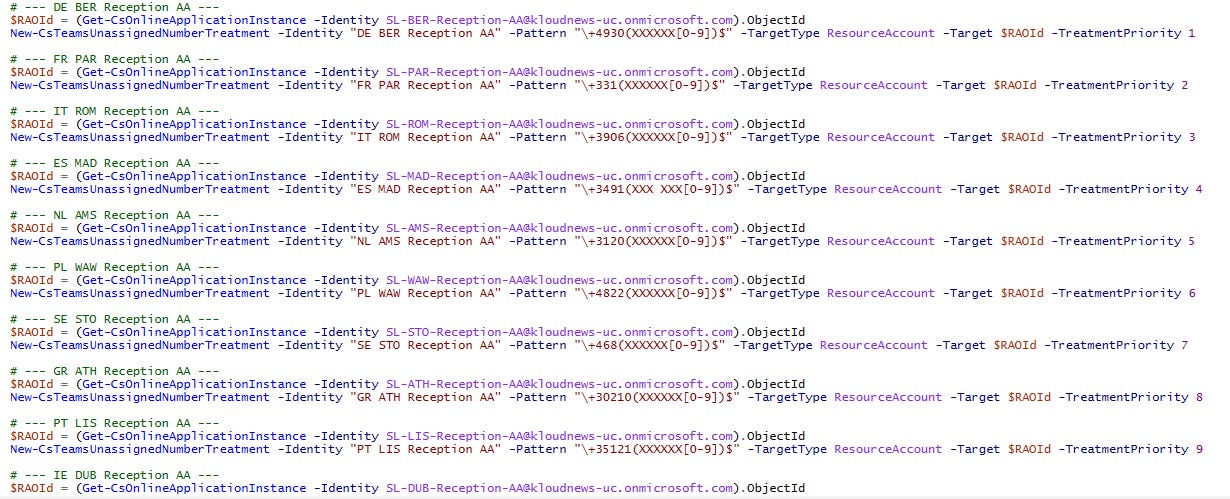
PowerShell Script you can find below copy or Github Teams_unassigned_number_template.html also made a HTML GUI, if organization do lot of expansion this will help every time when you add unassigned number range to TAC.
# --- DE BER Reception AA ---
$RAOId = (Get-CsOnlineApplicationInstance -Identity SL-BER-Reception-AA@kloudnews-uc.onmicrosoft.com).ObjectId
New-CsTeamsUnassignedNumberTreatment -Identity “DE BER Reception AA” -Pattern “\+4930(XXXXXX[0-9])$” -TargetType ResourceAccount -Target $RAOId -TreatmentPriority 1
# --- FR PAR Reception AA ---
$RAOId = (Get-CsOnlineApplicationInstance -Identity SL-PAR-Reception-AA@kloudnews-uc.onmicrosoft.com).ObjectId
New-CsTeamsUnassignedNumberTreatment -Identity “FR PAR Reception AA” -Pattern “\+331(XXXXXX[0-9])$” -TargetType ResourceAccount -Target $RAOId -TreatmentPriority 2
# --- IT ROM Reception AA ---
$RAOId = (Get-CsOnlineApplicationInstance -Identity SL-ROM-Reception-AA@kloudnews-uc.onmicrosoft.com).ObjectId
New-CsTeamsUnassignedNumberTreatment -Identity “IT ROM Reception AA” -Pattern “\+3906(XXXXXX[0-9])$” -TargetType ResourceAccount -Target $RAOId -TreatmentPriority 3
# --- ES MAD Reception AA ---
$RAOId = (Get-CsOnlineApplicationInstance -Identity SL-MAD-Reception-AA@kloudnews-uc.onmicrosoft.com).ObjectId
New-CsTeamsUnassignedNumberTreatment -Identity “ES MAD Reception AA” -Pattern “\+3491(XXX XXX[0-9])$” -TargetType ResourceAccount -Target $RAOId -TreatmentPriority 4
# --- NL AMS Reception AA ---
$RAOId = (Get-CsOnlineApplicationInstance -Identity SL-AMS-Reception-AA@kloudnews-uc.onmicrosoft.com).ObjectId
New-CsTeamsUnassignedNumberTreatment -Identity “NL AMS Reception AA” -Pattern “\+3120(XXXXXX[0-9])$” -TargetType ResourceAccount -Target $RAOId -TreatmentPriority 5
At our customer environments, we work extensively with Microsoft Teams Direct Routing and Operator Connect. While Microsoft Teams handles unassigned number routing at the tenant level, SBC platforms such as Ribbon SBC 1000, 2000, and 8000 enable a range of advanced capabilities that are not natively supported within Microsoft Teams.
Microsoft Article - Configure routing options for unassigned phone numbers - Microsoft Teams | Microsoft Learn


No comments:
Post a Comment