Friday, May 15, 2026

Teams Direct Routing with Ribbon 8k - WebGUI is not loading

Note: I start using Substack for my articles please please follow at https://kloudnews.substack.com/

Recently got an alert due to connectivity of the Ribbon 8k (strange) with OS 24.0, nothing wrong with networking. However, SolarWinds shows a failure.  


End up checking the SBC via GUI and got following 502 Bad gateway,

SBC is running but no idea why GUI failing, in this situation very limited things can do. Started with Putty and connected via console

Following are the command to find the status of the SBC VMs status 

Sudo -i 

Virsh list - Will help me to understand status of the SBCSWeEdge 

Podman ps - Will help me to understand status of the OS, dockers/container status

sys-tools debug - Will help me to run debug via CLI 

Anyway above cmds not helping to resolve the problems, but i end up running a reboot middle of a day :( 

systemctl reboot

This was help to bring back GUI after few minute time. While this is happening all the calls routed via DRaaS. We are using Call Tower as vendor still provide DRaaS even though NEW customer required to go with Operator Connect for Teams. 

Additional info

I have checked the debug logs (Ribbon 8K) couldnt found any storage issues.

Filesystem               1K-blocks    Used Available Use% Mounted on

devtmpfs                      4096       0      4096   0% /dev

tmpfs                      8172244    4944   8167300   1% /dev/shm

tmpfs                      3268900    9896   3259004   1% /run

efivarfs                       128      43        81  35% /sys/firmware/efi/efivars

/dev/mapper/vg00-root     36798464 6819696  29978768  19% /

/dev/sda4                   983040  279988    703052  29% /boot

/dev/sda3                   613160    7220    605940   2% /boot/efi

/dev/sda1                  8993268 6738272   1776568  80% /e8k-data

/dev/loop0                 3378444 3378444         0 100% /LocalRepos

/dev/mapper/vg00-storage   5054464   68300   4986164   2% /storage

/dev/mapper/vg00-var       2031616  851120   1180496  42% /var

/dev/mapper/vg00-var_log   2031616 1420064    611552  70% /var/log

/dev/mapper/vg00-var_tmp    983040   40116    942924   5% /var/tmp

/dev/mapper/vg00-tmp       2031616   47332   1984284   3% /tmp


If you like to learn more about Microsoft 365 world, Copilot Security, Ribbons, Microsoft Teams Direct Routing, Operator Connect or Calling plan or legacy voice product integration - https://kloudnews.substack.com/ 


Enterprise Guide to Unassigned Number Routing in Microsoft Teams

Note: I start using Substack for my articles please please follow at Madushka Dias writes | Kloud | Substack

Teams Voice Configure routing options for unassigned phone numbers 

Deprovisioned users still receiving calls 

Legacy telephony world this feature it called many words - Catch-all routing, Default destination routing, Vacant Number routing etc. This feature was introduced beginning of 2025 to most of the Tenants by Microsoft. This will fix lot of lost calls to route back to Voice application (Auto Attendant), Greeting or Person in Organization.

Every organization today at least maintain a room of 10-20% DIDs for future, if it is multinational, it will be every country and region sometimes.

Unassign Number routing in Teams will takecare all the unused, unassigned DID will provide meaning full option instead of unrouteable call.

Understanding media flow 


Following diagram AI created for me, first of did by #ClaudeAI and second did by #Copilot

Following diagram build by #Copilot

Following diagram build by ClaudeAI


PowerShell and Teams Admin Center

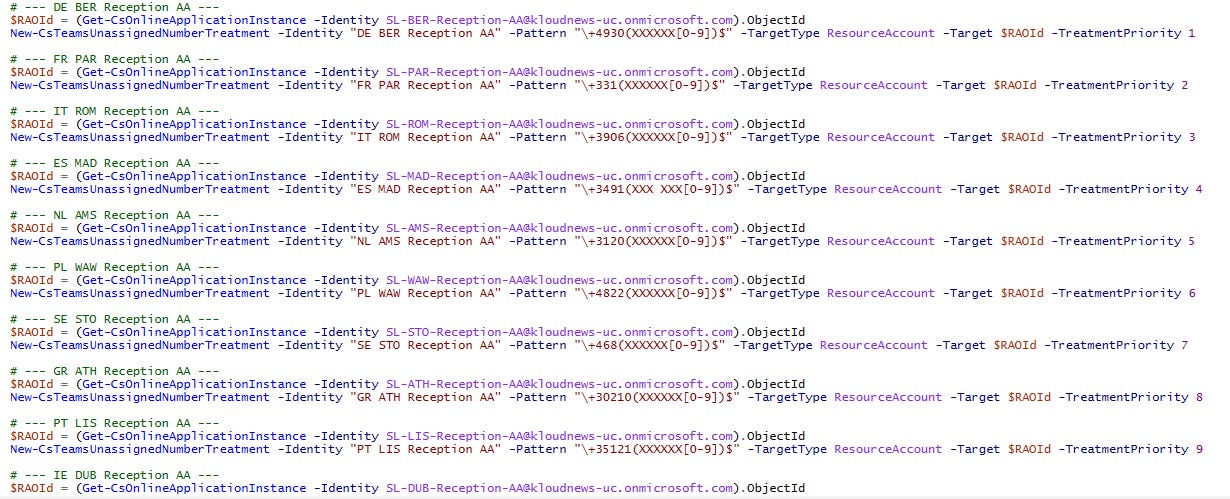
PowerShell Script you can find below copy or Github Teams_unassigned_number_template.html also made a HTML GUI, if organization do lot of expansion this will help every time when you add unassigned number range to TAC.

# --- DE BER Reception AA ---

$RAOId = (Get-CsOnlineApplicationInstance -Identity SL-BER-Reception-AA@kloudnews-uc.onmicrosoft.com).ObjectId

New-CsTeamsUnassignedNumberTreatment -Identity “DE BER Reception AA” -Pattern “\+4930(XXXXXX[0-9])$” -TargetType ResourceAccount -Target $RAOId -TreatmentPriority 1

# --- FR PAR Reception AA ---

$RAOId = (Get-CsOnlineApplicationInstance -Identity SL-PAR-Reception-AA@kloudnews-uc.onmicrosoft.com).ObjectId

New-CsTeamsUnassignedNumberTreatment -Identity “FR PAR Reception AA” -Pattern “\+331(XXXXXX[0-9])$” -TargetType ResourceAccount -Target $RAOId -TreatmentPriority 2

# --- IT ROM Reception AA ---

$RAOId = (Get-CsOnlineApplicationInstance -Identity SL-ROM-Reception-AA@kloudnews-uc.onmicrosoft.com).ObjectId

New-CsTeamsUnassignedNumberTreatment -Identity “IT ROM Reception AA” -Pattern “\+3906(XXXXXX[0-9])$” -TargetType ResourceAccount -Target $RAOId -TreatmentPriority 3

# --- ES MAD Reception AA ---

$RAOId = (Get-CsOnlineApplicationInstance -Identity SL-MAD-Reception-AA@kloudnews-uc.onmicrosoft.com).ObjectId

New-CsTeamsUnassignedNumberTreatment -Identity “ES MAD Reception AA” -Pattern “\+3491(XXX XXX[0-9])$” -TargetType ResourceAccount -Target $RAOId -TreatmentPriority 4

# --- NL AMS Reception AA ---

$RAOId = (Get-CsOnlineApplicationInstance -Identity SL-AMS-Reception-AA@kloudnews-uc.onmicrosoft.com).ObjectId

New-CsTeamsUnassignedNumberTreatment -Identity “NL AMS Reception AA” -Pattern “\+3120(XXXXXX[0-9])$” -TargetType ResourceAccount -Target $RAOId -TreatmentPriority 5

At our customer environments, we work extensively with Microsoft Teams Direct Routing and Operator Connect. While Microsoft Teams handles unassigned number routing at the tenant level, SBC platforms such as Ribbon SBC 1000, 2000, and 8000 enable a range of advanced capabilities that are not natively supported within Microsoft Teams.

Microsoft Article - Configure routing options for unassigned phone numbers - Microsoft Teams | Microsoft Learn 

Teams Direct Routing with Ribbon 8k - WebGUI is not loading

Note: I start using Substack for my articles please please follow at   https://kloudnews.substack.com/ Recently got an alert due to connecti...