Option #1 - Convert this number to user number and add forwarder to reception number. it can be Teams client or may be number forwarded.
Option #2 - Do the option#1 part of it and forward immediate Voicemail but for how many days? This wont be an option :D
Option #3 - Create new Auto Attendant immediately and Add the greeting (just like other reception number) so no one feel a difference or changes. Then all the call forwarded to existing to reception number: +1 365 xxx 6226 (Not migrated reception/main line)
Best option will be Option #3 and i have created AA and added a greeting and in the call routing options I select to External phone number which will ring the existing reception number.
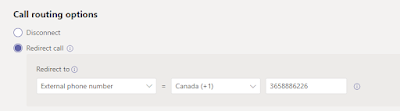
Unfortunately it was not working and i was checking the license etc for AA is all good. i had a Microsoft Phone System standard - Virtual User license for AA.
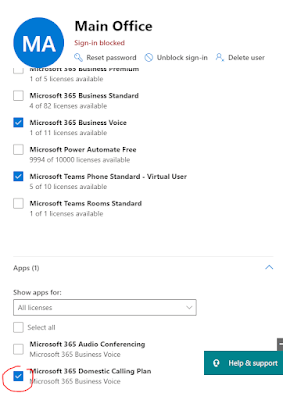
Fixed: It was for External call to be forwarded as redirect option from Auto Attendant it required Calling plan to be assigned but getting an error due to conflict of some license.
i assumed this was due to bundle license option and it had some license was conflicting. what i did was following and kept only domestic calling plan and assign to Auto Attendant addition Microsoft PhoneSystem standard - Virtual User license and everything works well. Try this and enjoy!


Configuring a Teams Auto Attendant (AA) with external number dialing helps businesses manage incoming calls professionally and route customers to the right department quickly. Many modern dental and healthcare clinics, including <a href="https://www.radentalstudio.com/>RA Dental Studio</a>, can benefit from automated call handling to improve patient communication and appointment management. Microsoft Teams Auto Attendant allows organizations to create custom greetings, menu options, and call routing workflows without needing traditional PBX systems. External number dialing enables callers to connect with mobile phones, branch offices, support teams, or third-party service providers outside the Teams environment. Administrators can configure these settings through the Microsoft Teams Admin Center by assigning resource accounts and linking calling plans or Direct Routing services. Businesses can also set business hours, holiday schedules, voicemail routing, and operator options for better customer support. Proper voice routing policies and dial plans ensure external calls are securely processed and compliant with organizational requirements. This setup improves call efficiency, reduces missed inquiries, and creates a more professional
ReplyDeletecommunication experience for customers and staff alike.